
Semaine 9
Activité 3
Exercices pratiques
Note : Les exercices ci-dessous ne donnent pas toutes les étapes pour réaliser les exercices. C’est à vous d’expérimenter et d’explorer afin de découvrir comment arriver aux résultats demandés. Pour devenir forgeron, il faut forger… pour devenir programmeur, il faut programmer. Vous pouvez utiliser les liens externes proposés dans l’activité précédente. Vous pouvez également utiliser le célèbre et très utile site https://stackoverflow.com/ si vous rencontrez des problèmes de programmation. Une solution est proposée pour chaque exercice (une solution parmi tant d’autres). Il est recommandé de faire plusieurs essais avant d’aller directement à la solution.
Exercice 1 – Créer un JFrame, un JLabel et un JButton
Comme premier exercice, vous devez créer l’interface suivante :

Pour ce faire :
- Démarrer NetBeans.
- Créer un nouveau projet de type: Java > Java application.
- Créer une classe Java de type JFrame en choisissant New File > Swing GUI Forms > JFrame Forms.
- Une fois le fichier créé et ouvert, utiliser l’éditeur graphique pour déposer le JLabel et le JButton. Dans l’exemple, le modèle de mise en page par défaut est utilisé.
- Utiliser le panneau de propriété (« properties » par défaut, du côté droit, sous la boîte d’outils) pour renommer le texte des éléments (item « text »).
/*
 * To change this license header, choose License Headers in Project Properties.
 * To change this template file, choose Tools | Templates
 * and open the template in the editor.
 */

/**
 *
 * @author Charles
 */
public class Exercice1 extends javax.swing.JFrame {

    /**
     * Creates new form Exercice1
     */
    public Exercice1() {
        initComponents();
    }

    /**
     * This method is called from within the constructor to initialize the form.
     * WARNING: Do NOT modify this code. The content of this method is always
     * regenerated by the Form Editor.
     */
    @SuppressWarnings("unchecked")
    // <editor-fold defaultstate="collapsed" desc="Generated Code">
    private void initComponents() {

        jLabel1 = new javax.swing.JLabel();
        jButton1 = new javax.swing.JButton();

        setDefaultCloseOperation(javax.swing.WindowConstants.EXIT_ON_CLOSE);

        jLabel1.setText("Ceci est le premier exercice");

        jButton1.setText("Bouton");

        javax.swing.GroupLayout layout = new javax.swing.GroupLayout(getContentPane());
        getContentPane().setLayout(layout);
        layout.setHorizontalGroup(
            layout.createParallelGroup(javax.swing.GroupLayout.Alignment.LEADING)
            .addGroup(layout.createSequentialGroup()
                .addGroup(layout.createParallelGroup(javax.swing.GroupLayout.Alignment.LEADING)
                    .addGroup(layout.createSequentialGroup()
                        .addGap(196, 196, 196)
                        .addComponent(jButton1))
                    .addGroup(layout.createSequentialGroup()
                        .addGap(162, 162, 162)
                        .addComponent(jLabel1)))
                .addContainerGap(176, Short.MAX_VALUE))
        );
        layout.setVerticalGroup(
            layout.createParallelGroup(javax.swing.GroupLayout.Alignment.LEADING)
            .addGroup(layout.createSequentialGroup()
                .addGap(98, 98, 98)
                .addComponent(jLabel1)
                .addGap(47, 47, 47)
                .addComponent(jButton1)
                .addContainerGap(112, Short.MAX_VALUE))
        );

        pack();
    }// </editor-fold>

    /**
     * @param args the command line arguments
     */
    public static void main(String args[]) {
        /* Set the Nimbus look and feel */
        //<editor-fold defaultstate="collapsed" desc=" Look and feel setting code (optional) ">
        /* If Nimbus (introduced in Java SE 6) is not available, stay with the default look and feel.
         * For details see http://download.oracle.com/javase/tutorial/uiswing/lookandfeel/plaf.html
         */
        try {
            for (javax.swing.UIManager.LookAndFeelInfo info : javax.swing.UIManager.getInstalledLookAndFeels()) {
                if ("Nimbus".equals(info.getName())) {
                    javax.swing.UIManager.setLookAndFeel(info.getClassName());
                    break;
                }
            }
        } catch (ClassNotFoundException ex) {
            java.util.logging.Logger.getLogger(Exercice1.class.getName()).log(java.util.logging.Level.SEVERE, null, ex);
        } catch (InstantiationException ex) {
            java.util.logging.Logger.getLogger(Exercice1.class.getName()).log(java.util.logging.Level.SEVERE, null, ex);
        } catch (IllegalAccessException ex) {
            java.util.logging.Logger.getLogger(Exercice1.class.getName()).log(java.util.logging.Level.SEVERE, null, ex);
        } catch (javax.swing.UnsupportedLookAndFeelException ex) {
            java.util.logging.Logger.getLogger(Exercice1.class.getName()).log(java.util.logging.Level.SEVERE, null, ex);
        }
        //</editor-fold>

        /* Create and display the form */
        java.awt.EventQueue.invokeLater(new Runnable() {
            public void run() {
                new Exercice1().setVisible(true);
            }
        });
    }

    // Variables declaration - do not modify
    private javax.swing.JButton jButton1;
    private javax.swing.JLabel jLabel1;
    // End of variables declaration
}
Exercice 2 – Ajouter un événement à un JButton
Reprenons le code de l’exercice 1 et ajoutons-y un événement lors de l’utilisation de la composante JButton, qui aura comme fonction de changer le texte affiché par le JLabel, en y ajoutant un compteur de « clics ». Une fois le bouton enfoncé, le texte du JLabel doit donc être modifié pour le texte suivant : « Compteur = 1 », puis « Compteur = 2 » lors d’un second clic. Pour ce faire :
- Appuyer à l’aide du bouton droit de la souris sur le JButton (dans l’éditeur graphique), puis choisir « Events > Action > actionPerformed ». Ceci vous fera basculer vers le mode « source » de la classe, où une méthode « jButton1ActionPerformed » a été créée.
- Ajouter le code nécessaire.
/*
 * To change this license header, choose License Headers in Project Properties.
 * To change this template file, choose Tools | Templates
 * and open the template in the editor.
 */

/**
 *
 * @author Charles
 */
public class Exercice1 extends javax.swing.JFrame {

    int compteur = 0;

    /**
     * Creates new form Exercice1
     */
    public Exercice1() {
        initComponents();
    }

    /**
     * This method is called from within the constructor to initialize the form.
     * WARNING: Do NOT modify this code. The content of this method is always
     * regenerated by the Form Editor.
     */
    @SuppressWarnings("unchecked")
    // <editor-fold defaultstate="collapsed" desc="Generated Code">
    private void initComponents() {

        jLabel1 = new javax.swing.JLabel();
        jButton1 = new javax.swing.JButton();

        setDefaultCloseOperation(javax.swing.WindowConstants.EXIT_ON_CLOSE);

        jLabel1.setText("Ceci est le premier exercice");

        jButton1.setText("Bouton");
        jButton1.addActionListener(new java.awt.event.ActionListener() {
            public void actionPerformed(java.awt.event.ActionEvent evt) {
                jButton1ActionPerformed(evt);
            }
        });

        javax.swing.GroupLayout layout = new javax.swing.GroupLayout(getContentPane());
        getContentPane().setLayout(layout);
        layout.setHorizontalGroup(
            layout.createParallelGroup(javax.swing.GroupLayout.Alignment.LEADING)
            .addGroup(layout.createSequentialGroup()
                .addGroup(layout.createParallelGroup(javax.swing.GroupLayout.Alignment.LEADING)
                    .addGroup(layout.createSequentialGroup()
                        .addGap(196, 196, 196)
                        .addComponent(jButton1))
                    .addGroup(layout.createSequentialGroup()
                        .addGap(162, 162, 162)
                        .addComponent(jLabel1)))
                .addContainerGap(176, Short.MAX_VALUE))
        );
        layout.setVerticalGroup(
            layout.createParallelGroup(javax.swing.GroupLayout.Alignment.LEADING)
            .addGroup(layout.createSequentialGroup()
                .addGap(98, 98, 98)
                .addComponent(jLabel1)
                .addGap(47, 47, 47)
                .addComponent(jButton1)
                .addContainerGap(112, Short.MAX_VALUE))
        );

        pack();
    }// </editor-fold>

    private void jButton1ActionPerformed(java.awt.event.ActionEvent evt) {
        compteur++;
        jLabel1.setText("Compteur = " + compteur);

    }

    /**
     * @param args the command line arguments
     */
    public static void main(String args[]) {
        /* Set the Nimbus look and feel */
        //<editor-fold defaultstate="collapsed" desc=" Look and feel setting code (optional) ">
        /* If Nimbus (introduced in Java SE 6) is not available, stay with the default look and feel.
         * For details see http://download.oracle.com/javase/tutorial/uiswing/lookandfeel/plaf.html
         */
        try {
            for (javax.swing.UIManager.LookAndFeelInfo info : javax.swing.UIManager.getInstalledLookAndFeels()) {
                if ("Nimbus".equals(info.getName())) {
                    javax.swing.UIManager.setLookAndFeel(info.getClassName());
                    break;
                }
            }
        } catch (ClassNotFoundException ex) {
            java.util.logging.Logger.getLogger(Exercice1.class.getName()).log(java.util.logging.Level.SEVERE, null, ex);
        } catch (InstantiationException ex) {
            java.util.logging.Logger.getLogger(Exercice1.class.getName()).log(java.util.logging.Level.SEVERE, null, ex);
        } catch (IllegalAccessException ex) {
            java.util.logging.Logger.getLogger(Exercice1.class.getName()).log(java.util.logging.Level.SEVERE, null, ex);
        } catch (javax.swing.UnsupportedLookAndFeelException ex) {
            java.util.logging.Logger.getLogger(Exercice1.class.getName()).log(java.util.logging.Level.SEVERE, null, ex);
        }
        //</editor-fold>

        /* Create and display the form */
        java.awt.EventQueue.invokeLater(new Runnable() {
            public void run() {
                new Exercice1().setVisible(true);
            }
        });
    }

    // Variables declaration - do not modify
    private javax.swing.JButton jButton1;
    private javax.swing.JLabel jLabel1;
    // End of variables declaration
}
Exercice 3 – Créer un formulaire avec différentes composantes, des JPanel et les modèles de mise en page appropriés.
Pour cet exercice, vous devez créer ce formulaire en utilisant différentes composantes de Swing et les modèles de mise en page appropriés :

Indices :
- Utiliser le BorderLayout avec un JPanel au centre pour les composantes du formulaire et un second JPanel à la section Sud (« South ») pour le bouton.
- Utiliser le GridLayout pour mettre les groupes de composantes verticales.
- Utiliser le FlowLayout pour chaque groupe de composantes horizontales (bref les lignes du formulaire).
/*
 * To change this license header, choose License Headers in Project Properties.
 * To change this template file, choose Tools | Templates
 * and open the template in the editor.
 */

/**
 *
 * @author Charles
 */
public class Exercice3 extends javax.swing.JFrame {

    /**
     * Creates new form Exercice3
     */
    public Exercice3() {
        initComponents();

        buttonGroup1.add(jRadioButton1);
        buttonGroup1.add(jRadioButton2);
    }

    /**
     * This method is called from within the constructor to initialize the form.
     * WARNING: Do NOT modify this code. The content of this method is always
     * regenerated by the Form Editor.
     */
    @SuppressWarnings("unchecked")
    // <editor-fold defaultstate="collapsed" desc="Generated Code">
    private void initComponents() {

        buttonGroup1 = new javax.swing.ButtonGroup();
        jPanel1 = new javax.swing.JPanel();
        jButton1 = new javax.swing.JButton();
        jPanel2 = new javax.swing.JPanel();
        jPanel3 = new javax.swing.JPanel();
        jLabel1 = new javax.swing.JLabel();
        jTextField1 = new javax.swing.JTextField();
        jPanel4 = new javax.swing.JPanel();
        jLabel2 = new javax.swing.JLabel();
        jRadioButton1 = new javax.swing.JRadioButton();
        jRadioButton2 = new javax.swing.JRadioButton();
        jPanel5 = new javax.swing.JPanel();
        jLabel3 = new javax.swing.JLabel();
        jPanel8 = new javax.swing.JPanel();
        jCheckBox1 = new javax.swing.JCheckBox();
        jCheckBox2 = new javax.swing.JCheckBox();
        jCheckBox3 = new javax.swing.JCheckBox();
        jPanel6 = new javax.swing.JPanel();
        jLabel4 = new javax.swing.JLabel();
        jScrollPane1 = new javax.swing.JScrollPane();
        jList1 = new javax.swing.JList();

        setDefaultCloseOperation(javax.swing.WindowConstants.EXIT_ON_CLOSE);

        jButton1.setText("Créer le personnage");
        jPanel1.add(jButton1);

        getContentPane().add(jPanel1, java.awt.BorderLayout.PAGE_END);

        jPanel2.setLayout(new java.awt.GridLayout(4, 0));

        jPanel3.setPreferredSize(new java.awt.Dimension(713, 60));

        jLabel1.setText("Identité :");
        jPanel3.add(jLabel1);

        jTextField1.setColumns(20);
        jTextField1.setToolTipText("");
        jPanel3.add(jTextField1);

        jPanel2.add(jPanel3);

        jLabel2.setText("Genre :");
        jPanel4.add(jLabel2);

        jRadioButton1.setText("Homme");
        jPanel4.add(jRadioButton1);

        jRadioButton2.setText("Femme");
        jPanel4.add(jRadioButton2);

        jPanel2.add(jPanel4);

        jLabel3.setText("Nationalité(s) :");
        jPanel5.add(jLabel3);

        jPanel8.setLayout(new java.awt.GridLayout(3, 0));

        jCheckBox1.setText("Ferengi");
        jPanel8.add(jCheckBox1);

        jCheckBox2.setText("Romulan");
        jPanel8.add(jCheckBox2);

        jCheckBox3.setText("Xindi");
        jPanel8.add(jCheckBox3);

        jPanel5.add(jPanel8);

        jPanel2.add(jPanel5);

        jLabel4.setText("Profession :");
        jPanel6.add(jLabel4);

        jList1.setModel(new javax.swing.AbstractListModel() {
            String[] strings = { "Cuisinier", "Enseignant", "Policier", "Artiste" };
            public int getSize() { return strings.length; }
            public Object getElementAt(int i) { return strings[i]; }
        });
        jScrollPane1.setViewportView(jList1);

        jPanel6.add(jScrollPane1);

        jPanel2.add(jPanel6);

        getContentPane().add(jPanel2, java.awt.BorderLayout.CENTER);

        pack();
    }// </editor-fold>

    /**
     * @param args the command line arguments
     */
    public static void main(String args[]) {
        /* Set the Nimbus look and feel */
        //<editor-fold defaultstate="collapsed" desc=" Look and feel setting code (optional) ">
        /* If Nimbus (introduced in Java SE 6) is not available, stay with the default look and feel.
         * For details see http://download.oracle.com/javase/tutorial/uiswing/lookandfeel/plaf.html
         */
        try {
            for (javax.swing.UIManager.LookAndFeelInfo info : javax.swing.UIManager.getInstalledLookAndFeels()) {
                if ("Nimbus".equals(info.getName())) {
                    javax.swing.UIManager.setLookAndFeel(info.getClassName());
                    break;
                }
            }
        } catch (ClassNotFoundException ex) {
            java.util.logging.Logger.getLogger(Exercice3.class.getName()).log(java.util.logging.Level.SEVERE, null, ex);
        } catch (InstantiationException ex) {
            java.util.logging.Logger.getLogger(Exercice3.class.getName()).log(java.util.logging.Level.SEVERE, null, ex);
        } catch (IllegalAccessException ex) {
            java.util.logging.Logger.getLogger(Exercice3.class.getName()).log(java.util.logging.Level.SEVERE, null, ex);
        } catch (javax.swing.UnsupportedLookAndFeelException ex) {
            java.util.logging.Logger.getLogger(Exercice3.class.getName()).log(java.util.logging.Level.SEVERE, null, ex);
        }
        //</editor-fold>

        /* Create and display the form */
        java.awt.EventQueue.invokeLater(new Runnable() {
            public void run() {
                new Exercice3().setVisible(true);
            }
        });
    }

    // Variables declaration - do not modify
    private javax.swing.ButtonGroup buttonGroup1;
    private javax.swing.JButton jButton1;
    private javax.swing.JCheckBox jCheckBox1;
    private javax.swing.JCheckBox jCheckBox2;
    private javax.swing.JCheckBox jCheckBox3;
    private javax.swing.JLabel jLabel1;
    private javax.swing.JLabel jLabel2;
    private javax.swing.JLabel jLabel3;
    private javax.swing.JLabel jLabel4;
    private javax.swing.JList jList1;
    private javax.swing.JPanel jPanel1;
    private javax.swing.JPanel jPanel2;
    private javax.swing.JPanel jPanel3;
    private javax.swing.JPanel jPanel4;
    private javax.swing.JPanel jPanel5;
    private javax.swing.JPanel jPanel6;
    private javax.swing.JPanel jPanel8;
    private javax.swing.JRadioButton jRadioButton1;
    private javax.swing.JRadioButton jRadioButton2;
    private javax.swing.JScrollPane jScrollPane1;
    private javax.swing.JTextField jTextField1;
    // End of variables declaration
}
Exercice 4 – Utiliser la composante JTable
La composante JTable est très utile, mais elle présente un deuxième niveau de complexité dans son utilisation. Afin d’afficher des données et de gérer son édition (si nécessaire), un deuxième type d’objet implémentant l’interface TableModel (Attention! ici c’est le concept d’interface Java et non d’interface humain-machine) est nécessaire pour gérer les accès aux données du tableau. Parallèlement, il en est de même pour les JList et JComboxBox avec l’interface ListModel. Il est donc nécessaire de créer une classe implémentant l’interface TableModel et de l’associer à la jTable en utilisant la méthode « setModel ». Pour cet exercice, vous devez donc créer cette interface intégrant une JTable :

Quelques indices :
- Vous pouvez créer une classe interne au JFrame qui implémentera l’interface TableModel.
- Utiliser une matrice (String[][]) ou bien des ArrayList de ArrayList (ArrayList<ArrayList>) comme conteneur des éléments du tableau.
/*
 * To change this license header, choose License Headers in Project Properties.
 * To change this template file, choose Tools | Templates
 * and open the template in the editor.
 */

import java.util.ArrayList;
import javax.swing.event.TableModelListener;
import javax.swing.table.TableModel;

/**
 *
 * @author Charles
 */
public class Exercice4 extends javax.swing.JFrame {

    ExempleTableModel model;

    /**
     * Creates new form Exercice4
     */
    public Exercice4() {
        initComponents();

        model = new ExempleTableModel();

        String[] alice = {"Alice","Femme","Romulan","Enseignant"};
        String[] bob = {"Bob","Homme","Ferengi","Cosmonaute"};
        model.addPersonnage(alice);
        model.addPersonnage(bob);

        jTable1.setModel(model);
    }

    /**
     * This method is called from within the constructor to initialize the form.
     * WARNING: Do NOT modify this code. The content of this method is always
     * regenerated by the Form Editor.
     */
    @SuppressWarnings("unchecked")
    // <editor-fold defaultstate="collapsed" desc="Generated Code">
    private void initComponents() {

        jTabbedPane1 = new javax.swing.JTabbedPane();
        jPanel1 = new javax.swing.JPanel();
        jScrollPane1 = new javax.swing.JScrollPane();
        jTable1 = new javax.swing.JTable();

        setDefaultCloseOperation(javax.swing.WindowConstants.EXIT_ON_CLOSE);
        getContentPane().setLayout(new javax.swing.BoxLayout(getContentPane(), javax.swing.BoxLayout.LINE_AXIS));

        jPanel1.setBorder(javax.swing.BorderFactory.createTitledBorder("Exemple de JTable"));
        jPanel1.setLayout(new javax.swing.BoxLayout(jPanel1, javax.swing.BoxLayout.LINE_AXIS));

        jTable1.setModel(new javax.swing.table.DefaultTableModel(
            new Object [][] {
                {null, null, null, null},
                {null, null, null, null},
                {null, null, null, null},
                {null, null, null, null}
            },
            new String [] {
                "Title 1", "Title 2", "Title 3", "Title 4"
            }
        ));
        jScrollPane1.setViewportView(jTable1);

        jPanel1.add(jScrollPane1);

        jTabbedPane1.addTab("JTable", jPanel1);

        getContentPane().add(jTabbedPane1);

        pack();
    }// </editor-fold>

    /**
     * @param args the command line arguments
     */
    public static void main(String args[]) {
        /* Set the Nimbus look and feel */
        //<editor-fold defaultstate="collapsed" desc=" Look and feel setting code (optional) ">
        /* If Nimbus (introduced in Java SE 6) is not available, stay with the default look and feel.
         * For details see http://download.oracle.com/javase/tutorial/uiswing/lookandfeel/plaf.html
         */
        try {
            for (javax.swing.UIManager.LookAndFeelInfo info : javax.swing.UIManager.getInstalledLookAndFeels()) {
                if ("Nimbus".equals(info.getName())) {
                    javax.swing.UIManager.setLookAndFeel(info.getClassName());
                    break;
                }
            }
        } catch (ClassNotFoundException ex) {
            java.util.logging.Logger.getLogger(Exercice4.class.getName()).log(java.util.logging.Level.SEVERE, null, ex);
        } catch (InstantiationException ex) {
            java.util.logging.Logger.getLogger(Exercice4.class.getName()).log(java.util.logging.Level.SEVERE, null, ex);
        } catch (IllegalAccessException ex) {
            java.util.logging.Logger.getLogger(Exercice4.class.getName()).log(java.util.logging.Level.SEVERE, null, ex);
        } catch (javax.swing.UnsupportedLookAndFeelException ex) {
            java.util.logging.Logger.getLogger(Exercice4.class.getName()).log(java.util.logging.Level.SEVERE, null, ex);
        }
        //</editor-fold>

        /* Create and display the form */
        java.awt.EventQueue.invokeLater(new Runnable() {
            public void run() {
                new Exercice4().setVisible(true);
            }
        });
    }

    // Variables declaration - do not modify
    private javax.swing.JPanel jPanel1;
    private javax.swing.JScrollPane jScrollPane1;
    private javax.swing.JTabbedPane jTabbedPane1;
    private javax.swing.JTable jTable1;
    // End of variables declaration

    private class ExempleTableModel implements TableModel {
        final int NB_COLUMN = 4;
            final String columnName[] = {"Identité", "Genre", "Nationalités", "Profession"};

            ArrayList<String[]> personnages = new ArrayList<String[]>();

            @Override
            public int getRowCount() {
                return personnages.size();
            }

            @Override
            public int getColumnCount() {
                return NB_COLUMN;
            }

            @Override
            public String getColumnName(int columnIndex) {
                return columnName[columnIndex];
            }

            @Override
            public Class<?> getColumnClass(int columnIndex) {
                return String.class;
            }

            @Override
            public boolean isCellEditable(int rowIndex, int columnIndex) {
                return false;
            }

            @Override
            public Object getValueAt(int rowIndex, int columnIndex) {
                return personnages.get(rowIndex)[columnIndex];
            }

            @Override
            public void setValueAt(Object aValue, int rowIndex, int columnIndex) {
                personnages.get(rowIndex)[columnIndex] = aValue.toString();
            }

            @Override
            public void addTableModelListener(TableModelListener l) {
                // On ajoute rien
            }

            @Override
            public void removeTableModelListener(TableModelListener l) {
                // On ajoute rien
            }

            public void addPersonnage(String[] personnage) {
                personnages.add(personnage);
            }
    }
}
Exercice 5 – Insérer des images dans une interface
Dans cet exercice, vous devez ajouter une icône sur un JButton et ajouter une photo à l’interface à l’aide du gestionnaire de fichier (composante JFileChooser). Lorsque le JButton est enfoncé, on voit apparaître un JFileChooser permettant de choisir une image sur votre ordinateur et d’afficher celle-ci à la gauche du bouton dans un JPanel réservé à cette fin :

Indices :
- Utiliser un JLabel sans texte et y ajouter un objet ImageIcon représentant l’image choisie dans le JFileChooser.
- Utiliser le code suivant pour ajuster la taille de l’image choisie à la taille du JPanel contenant le JLabel décrit précédemment :
File file = jFileChooser1.getSelectedFile();

ImageIcon icon = new ImageIcon(file.getPath());
Image img = icon.getImage();
Image newimg = img.getScaledInstance(jPanel1.getWidth(), jPanel1.getHeight(),  java.awt.Image.SCALE_SMOOTH);
icon = new ImageIcon(newimg);

jLabel1.setIcon(icon);
import java.io.File;
import javax.swing.ImageIcon;

/*
 * To change this license header, choose License Headers in Project Properties.
 * To change this template file, choose Tools | Templates
 * and open the template in the editor.
 */

/**
 *
 * @author Charles
 */
public class Exercice5 extends javax.swing.JFrame {

    /**
     * Creates new form Exercice5
     */
    public Exercice5() {
        initComponents();
    }

    /**
     * This method is called from within the constructor to initialize the form.
     * WARNING: Do NOT modify this code. The content of this method is always
     * regenerated by the Form Editor.
     */
    @SuppressWarnings("unchecked")
    // <editor-fold defaultstate="collapsed" desc="Generated Code">
    private void initComponents() {

        jFileChooser1 = new javax.swing.JFileChooser();
        jPanel1 = new javax.swing.JPanel();
        jLabel1 = new javax.swing.JLabel();
        jPanel2 = new javax.swing.JPanel();
        jButton1 = new javax.swing.JButton();

        setDefaultCloseOperation(javax.swing.WindowConstants.EXIT_ON_CLOSE);
        setMinimumSize(new java.awt.Dimension(500, 500));

        jPanel1.setBorder(javax.swing.BorderFactory.createTitledBorder("Image"));
        jPanel1.setLayout(new java.awt.GridLayout(1, 0));
        jPanel1.add(jLabel1);

        getContentPane().add(jPanel1, java.awt.BorderLayout.CENTER);

        jPanel2.setMinimumSize(new java.awt.Dimension(50, 10));
        jPanel2.setLayout(new java.awt.GridBagLayout());

        jButton1.setIcon(new javax.swing.ImageIcon(getClass().getResource("/unnamed.png"))); // NOI18N
        jButton1.setText("Choisir un fichier");
        jButton1.addActionListener(new java.awt.event.ActionListener() {
            public void actionPerformed(java.awt.event.ActionEvent evt) {
                jButton1ActionPerformed(evt);
            }
        });
        jPanel2.add(jButton1, new java.awt.GridBagConstraints());

        getContentPane().add(jPanel2, java.awt.BorderLayout.LINE_END);

        pack();
    }// </editor-fold>

    private void jButton1ActionPerformed(java.awt.event.ActionEvent evt) {
        // TODO add your handling code here:
        jFileChooser1.setVisible(true);
        int returnVal = jFileChooser1.showOpenDialog(this);
        if (returnVal == jFileChooser1.APPROVE_OPTION) {
            File file = jFileChooser1.getSelectedFile();

            ImageIcon icon = new ImageIcon(file.getPath());
            Image img = icon.getImage();
            Image newimg = img.getScaledInstance(jPanel1.getWidth(), jPanel1.getHeight(),  java.awt.Image.SCALE_SMOOTH);
            icon = new ImageIcon(newimg);

            jLabel1.setIcon(icon);

        }
    }

    /**
     * @param args the command line arguments
     */
    public static void main(String args[]) {
        /* Set the Nimbus look and feel */
        //<editor-fold defaultstate="collapsed" desc=" Look and feel setting code (optional) ">
        /* If Nimbus (introduced in Java SE 6) is not available, stay with the default look and feel.
         * For details see http://download.oracle.com/javase/tutorial/uiswing/lookandfeel/plaf.html
         */
        try {
            for (javax.swing.UIManager.LookAndFeelInfo info : javax.swing.UIManager.getInstalledLookAndFeels()) {
                if ("Nimbus".equals(info.getName())) {
                    javax.swing.UIManager.setLookAndFeel(info.getClassName());
                    break;
                }
            }
        } catch (ClassNotFoundException ex) {
            java.util.logging.Logger.getLogger(Exercice5.class.getName()).log(java.util.logging.Level.SEVERE, null, ex);
        } catch (InstantiationException ex) {
            java.util.logging.Logger.getLogger(Exercice5.class.getName()).log(java.util.logging.Level.SEVERE, null, ex);
        } catch (IllegalAccessException ex) {
            java.util.logging.Logger.getLogger(Exercice5.class.getName()).log(java.util.logging.Level.SEVERE, null, ex);
        } catch (javax.swing.UnsupportedLookAndFeelException ex) {
            java.util.logging.Logger.getLogger(Exercice5.class.getName()).log(java.util.logging.Level.SEVERE, null, ex);
        }
        //</editor-fold>

        /* Create and display the form */
        java.awt.EventQueue.invokeLater(new Runnable() {
            public void run() {
                new Exercice5().setVisible(true);
            }
        });
    }

    // Variables declaration - do not modify
    private javax.swing.JButton jButton1;
    private javax.swing.JFileChooser jFileChooser1;
    private javax.swing.JLabel jLabel1;
    private javax.swing.JPanel jPanel1;
    private javax.swing.JPanel jPanel2;
    // End of variables declaration
}
Exercice 6 – Utiliser le HTML pour formater un texte
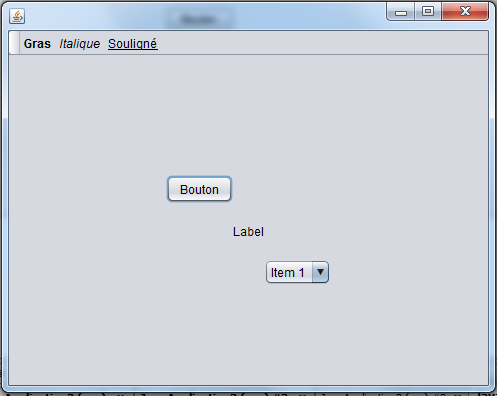
Avec l’API Swing, il est possible d’utiliser la syntaxe de HTML pour formater le texte présent dans les composantes graphiques d’une interface. Pour ce faire, vous devez créer une interface qui permettra de formater le texte de plusieurs composantes (1 JButton, 1 JLabel et les éléments de 1 JComboBox) à l’aide de boutons sur une barre d’outils. Ainsi, le texte peut être mis en gras, en italique et en souligné. Voici l’interface en question :
Indices :
- Pour formater en gras, par exemple, vous devez ajouter au texte à afficher : <html><b>Le texte à mettre en gras</b></html>.
- N’oubliez pas d’itérer pour toutes les composantes du JComboxBox. Utiliser le DefaultComboBoxModel<StringBuffer> afin de pouvoir modifier les éléments (en Java, l’objet String est immuable comparativement au StringBuffer).
- Pour afficher les composantes en escalier, nous avons utilisé le GrigBagLayout et avons ajusté les contraintes. Pour ce faire : 1- choisir le GridBagLayout à l’aide du bouton droit de la souris sur le JPanel contenant les composantes graphiques; 2- avec le même menu du bouton droit de la souris, choisir « Customize Layout »; 3- utiliser l’éditeur pour placer les composantes à l’endroit voulu et les options de gauche pour l’espacement.
- Vous pouvez consulter cette page pour des exemples de balise HTML afin de formater du texte : https://www.w3schools.com/html/html_formatting.asp.
import javax.swing.DefaultComboBoxModel;

/*
 * To change this license header, choose License Headers in Project Properties.
 * To change this template file, choose Tools | Templates
 * and open the template in the editor.
 */

/**
 *
 * @author Charles
 */
public class Exercice6 extends javax.swing.JFrame {

    /**
     * Creates new form Exercice6
     */
    public Exercice6() {
        initComponents();

        // Création du StringBuffer pour les ites du ComboBox
        StringBuffer[] data = new StringBuffer[2];
        data[0] = new StringBuffer("Test1");
        data[1] = new StringBuffer("Test2");

        DefaultComboBoxModel<StringBuffer> model = new DefaultComboBoxModel<>(data);

        jComboBox1.setModel(model);
    }

    /**
     * This method is called from within the constructor to initialize the form.
     * WARNING: Do NOT modify this code. The content of this method is always
     * regenerated by the Form Editor.
     */
    @SuppressWarnings("unchecked")
    // <editor-fold defaultstate="collapsed" desc="Generated Code">
    private void initComponents() {
        java.awt.GridBagConstraints gridBagConstraints;

        jToolBar1 = new javax.swing.JToolBar();
        jButton1 = new javax.swing.JButton();
        jButton2 = new javax.swing.JButton();
        jButton3 = new javax.swing.JButton();
        jPanel3 = new javax.swing.JPanel();
        jButton4 = new javax.swing.JButton();
        jLabel1 = new javax.swing.JLabel();
        jComboBox1 = new javax.swing.JComboBox();

        setDefaultCloseOperation(javax.swing.WindowConstants.EXIT_ON_CLOSE);

        jToolBar1.setRollover(true);

        jButton1.setText("<html><b>Gras</b></html>");
        jButton1.setFocusable(false);
        jButton1.setHorizontalTextPosition(javax.swing.SwingConstants.CENTER);
        jButton1.setVerticalTextPosition(javax.swing.SwingConstants.BOTTOM);
        jButton1.addActionListener(new java.awt.event.ActionListener() {
            public void actionPerformed(java.awt.event.ActionEvent evt) {
                jButton1ActionPerformed(evt);
            }
        });
        jToolBar1.add(jButton1);

        jButton2.setText("<html><i>Italique</i></html>");
        jButton2.setFocusable(false);
        jButton2.setHorizontalTextPosition(javax.swing.SwingConstants.CENTER);
        jButton2.setVerticalTextPosition(javax.swing.SwingConstants.BOTTOM);
        jButton2.addActionListener(new java.awt.event.ActionListener() {
            public void actionPerformed(java.awt.event.ActionEvent evt) {
                jButton2ActionPerformed(evt);
            }
        });
        jToolBar1.add(jButton2);

        jButton3.setText("<html><u>Souligné</u></html>");
        jButton3.setFocusable(false);
        jButton3.setHorizontalTextPosition(javax.swing.SwingConstants.CENTER);
        jButton3.setVerticalTextPosition(javax.swing.SwingConstants.BOTTOM);
        jButton3.addActionListener(new java.awt.event.ActionListener() {
            public void actionPerformed(java.awt.event.ActionEvent evt) {
                jButton3ActionPerformed(evt);
            }
        });
        jToolBar1.add(jButton3);

        getContentPane().add(jToolBar1, java.awt.BorderLayout.PAGE_START);

        jPanel3.setLayout(new java.awt.GridBagLayout());

        jButton4.setText("Bouton");
        gridBagConstraints = new java.awt.GridBagConstraints();
        gridBagConstraints.insets = new java.awt.Insets(20, 0, 0, 0);
        jPanel3.add(jButton4, gridBagConstraints);

        jLabel1.setText("Label");
        gridBagConstraints = new java.awt.GridBagConstraints();
        gridBagConstraints.gridx = 1;
        gridBagConstraints.gridy = 1;
        gridBagConstraints.insets = new java.awt.Insets(20, 0, 0, 0);
        jPanel3.add(jLabel1, gridBagConstraints);

        jComboBox1.setModel(new javax.swing.DefaultComboBoxModel(new String[] { "Item 1", "Item 2", "Item 3", "Item 4" }));
        gridBagConstraints = new java.awt.GridBagConstraints();
        gridBagConstraints.gridx = 2;
        gridBagConstraints.gridy = 2;
        gridBagConstraints.insets = new java.awt.Insets(20, 0, 0, 0);
        jPanel3.add(jComboBox1, gridBagConstraints);

        getContentPane().add(jPanel3, java.awt.BorderLayout.CENTER);

        pack();
    }// </editor-fold>

    private void jButton1ActionPerformed(java.awt.event.ActionEvent evt) {

        final String ouverture = "<html><b>";
        final String fermeture = "</b></html>";

        jButton4.setText(ouverture + jButton4.getText() + fermeture);
        jLabel1.setText(ouverture + jLabel1.getText() + fermeture);

        for(int i = 0; i < jComboBox1.getModel().getSize(); i++) {
            ((StringBuffer) jComboBox1.getModel().getElementAt(i)).insert(0, ouverture).append(fermeture);
        }

    }

    private void jButton2ActionPerformed(java.awt.event.ActionEvent evt) {
        final String ouverture = "<html><i>";
        final String fermeture = "</i></html>";

        jButton4.setText(ouverture + jButton4.getText() + fermeture);
        jLabel1.setText(ouverture + jLabel1.getText() + fermeture);

        for(int i = 0; i < jComboBox1.getModel().getSize(); i++) {
            ((StringBuffer) jComboBox1.getModel().getElementAt(i)).insert(0, ouverture).append(fermeture);
        }
    }

    private void jButton3ActionPerformed(java.awt.event.ActionEvent evt) {
        final String ouverture = "<html><u>";
        final String fermeture = "</u></html>";

        jButton4.setText(ouverture + jButton4.getText() + fermeture);
        jLabel1.setText(ouverture + jLabel1.getText() + fermeture);

        for(int i = 0; i < jComboBox1.getModel().getSize(); i++) {
            ((StringBuffer) jComboBox1.getModel().getElementAt(i)).insert(0, ouverture).append(fermeture);
        }
    }

    /**
     * @param args the command line arguments
     */
    public static void main(String args[]) {
        /* Set the Nimbus look and feel */
        //<editor-fold defaultstate="collapsed" desc=" Look and feel setting code (optional) ">
        /* If Nimbus (introduced in Java SE 6) is not available, stay with the default look and feel.
         * For details see http://download.oracle.com/javase/tutorial/uiswing/lookandfeel/plaf.html
         */
        try {
            for (javax.swing.UIManager.LookAndFeelInfo info : javax.swing.UIManager.getInstalledLookAndFeels()) {
                if ("Nimbus".equals(info.getName())) {
                    javax.swing.UIManager.setLookAndFeel(info.getClassName());
                    break;
                }
            }
        } catch (ClassNotFoundException ex) {
            java.util.logging.Logger.getLogger(Exercice6.class.getName()).log(java.util.logging.Level.SEVERE, null, ex);
        } catch (InstantiationException ex) {
            java.util.logging.Logger.getLogger(Exercice6.class.getName()).log(java.util.logging.Level.SEVERE, null, ex);
        } catch (IllegalAccessException ex) {
            java.util.logging.Logger.getLogger(Exercice6.class.getName()).log(java.util.logging.Level.SEVERE, null, ex);
        } catch (javax.swing.UnsupportedLookAndFeelException ex) {
            java.util.logging.Logger.getLogger(Exercice6.class.getName()).log(java.util.logging.Level.SEVERE, null, ex);
        }
        //</editor-fold>

        /* Create and display the form */
        java.awt.EventQueue.invokeLater(new Runnable() {
            public void run() {
                new Exercice6().setVisible(true);
            }
        });
    }

    // Variables declaration - do not modify
    private javax.swing.JButton jButton1;
    private javax.swing.JButton jButton2;
    private javax.swing.JButton jButton3;
    private javax.swing.JButton jButton4;
    private javax.swing.JComboBox jComboBox1;
    private javax.swing.JLabel jLabel1;
    private javax.swing.JPanel jPanel3;
    private javax.swing.JToolBar jToolBar1;
    // End of variables declaration
}